

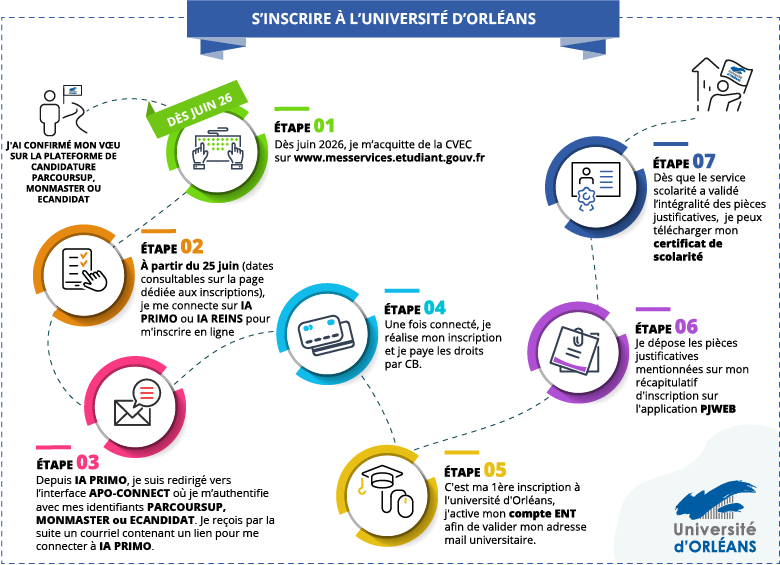
Would you like to register in the second or third year of a Bachelor’s or BUT program, a Professional Bachelor’s degree, or a Master’s program at the University of Orléans? Whether you are re-enrolling or applying for the first time, discover our simple registration process in just seven steps.
Vous souhaitez vous inscrire ou réinscrire en 2ème ou 3ème année de Licence ou de BUT, en Licence Professionnelle ou en 2ème année de Master à l'Université d'Orléans ? Que ce soit pour une réinscription ou une première inscription, découvrez la procédure simple pour s'inscrire en 7 étapes seulement.
Key datesAdministrative registrations start:
|
All students enrolled in initial higher education programs must obtain a proof of payment (or exemption, for scholarship students) of the Student and Campus Life Contribution (CVEC) before registering at their institution.
To obtain your certificate:
- Log in or create an account on the dedicated website;
- Indicate your city of study;
- Pay the CVEC;
- Obtain the certificate number to provide during registration.
You are enrolling for the first time at the University of Orléans in the second or third year of a BUT program or in a professional bachelor’s degree program, and you have been admitted through Ecandidat:
- Access the IAWEB Primo registration portal.
When you first log in to IA PRIMO, you will be redirected to the APO-CONNECT interface, where you will be asked to authenticate using your Parcoursup credentials (username, date of birth, and email address used on the platform). You will then receive an email containing the link to access IA PRIMO at the address you provided.
You are enrolling for the first time at the University of Orléans in the second or third year of a bachelor’s degree program and have been admitted through a credit transfer process:
- Download the registration file:
- Send the completed file to your Faculty (UFR) or IUT
Re-enrollment at the University of Orléans:
- Access the IAWEB Réins re-enrollment portal.
Payment must be made online by credit card, either in a single payment or in three installments (available only for fees exceeding €600).
If you are registering at the University of Orléans for the first time, or if you previously interrupted your studies at the university, you must activate your digital account (ENT) to access the University’s online services.
Access the PJWEB platform from your ENT portal to submit your supporting documents.
You must upload these documents on PJWEB using the tile available in your ENT student portal.
Your registration will only be finalized once the documents have been validated by an administrative officer.
| Please note: you will also be asked to provide authorization for image rights and access to personal data. In accordance with data protection regulations, the University must obtain your consent to use your data. |
Once your administrative registration has been validated, you will be able to download your official documents from your ENT student portal.
To obtain your student card, please follow the instructions provided for each program.
You are now officially registered as a student at the University of Orléans, and you must complete your course registration.
This step is mandatory for your enrollment in all courses and for access to your personalized class schedule. It is also required in order to take your exams.
Course registration conducted online is available at the following link:
https://ip-web.univ-orleans.fr/ip-web/loginInscription.jsf Important: The IP Web services will be closed from July 18 at 12:00 p.m. until August 20 at 9:00 a.m.